
Streamline Your ARC Team Workflow with WordPress + Automation
Managing an ARC team doesn’t have to feel like a chaotic mess of spreadsheets, emails, and unanswered DMs. It’s thrilling to have readers ready to devour your book—but let’s be real: chasing feedback and reviews shouldn’t become your full-time job.
If you’re not sure what an ARC Team or ARC Reader is —learn more here.
This week, I’m walking you through how to use WordPress, Elementor, FluentCRM, and a handful of smart plugins to streamline and automate the entire process.
Here’s the kicker: this system isn’t just for ARCs. You can adapt it to protect premium content, sell memberships, or offer exclusive perks—all without third-party apps or extra plugins like Wishlist Member or Content Protection Pro. Think of it as your all-in-one content control hub: flexible, powerful, and fully yours.
This isn’t just a workflow—it’s a real-world example of how WordPress can simplify your life by protecting content, tracking engagement, and automating communications. Let’s break it down.
Why Automate Your ARC Workflow?
ARC readers are your early champions. They’re the ones who give you feedback, build hype, and leave those all-important reviews that help sell books. But keeping track of who’s received the book, sent feedback, and posted reviews? That’s a recipe for overwhelm.
Here’s why automation changes the game:
-
Minimize Content Risk: Restrict access to approved readers, reducing the chances of rogue copies circulating. No system is 100% foolproof, but this gives you a solid layer of security.
-
Simplify Communication: Automate every step, from welcome emails to deadline reminders, so you’re not drowning in manual follow-ups.
-
Track and Respond Smarter: Monitor who’s engaging with your ARC content—and nudge the ones who aren’t—with strategic automations.
By creating an automated ARC workflow, you’ll save hours of time, minimize mistakes, and set yourself up for smooth launches—not just for this book, but every book after.
What You’ll Need
Here’s the toolkit for this system:
-
Elementor Pro: The Pro version is non-negotiable if you want features like conditional visibility, which lets you tailor what each user sees based on their role.
-
Role Manager Plugin: Create a custom “ARC Member” role to control access to your content without the complexity of a full-blown membership plugin.
-
FluentCRM: This WordPress-integrated ESP handles everything from welcome emails to advanced tracking, keeping your data on your site.
-
PDF Embedder: Securely display your ARC file without offering a download option.
As with all my automations, think of this as a recipe. You can swap out the ingredients based on what you already use. For example:
-
Use MailerLite, Mailchimp, or Klaviyo instead of FluentCRM if that’s your jam.
-
Replace PDF Embedder with BookFunnel to add watermarks and track downloads for extra peace of mind and use their landing pages.
This isn’t about locking yourself into my tools—it’s about creating a system that works for you.
Step 1: Install and Configure Your Plugins
To build a streamlined ARC management system, you’ll need four essential plugins. Each plays a specific role in making the process seamless, secure, and easy to maintain. Here’s the rundown:
-
Elementor Pro: Your ARC page designer. With features like drag-and-drop layouts and conditional visibility, it ensures your ARC page is both user-friendly and secure. Conditional visibility is the magic wand that shows (or hides) forms, files, and buttons based on a user’s role.
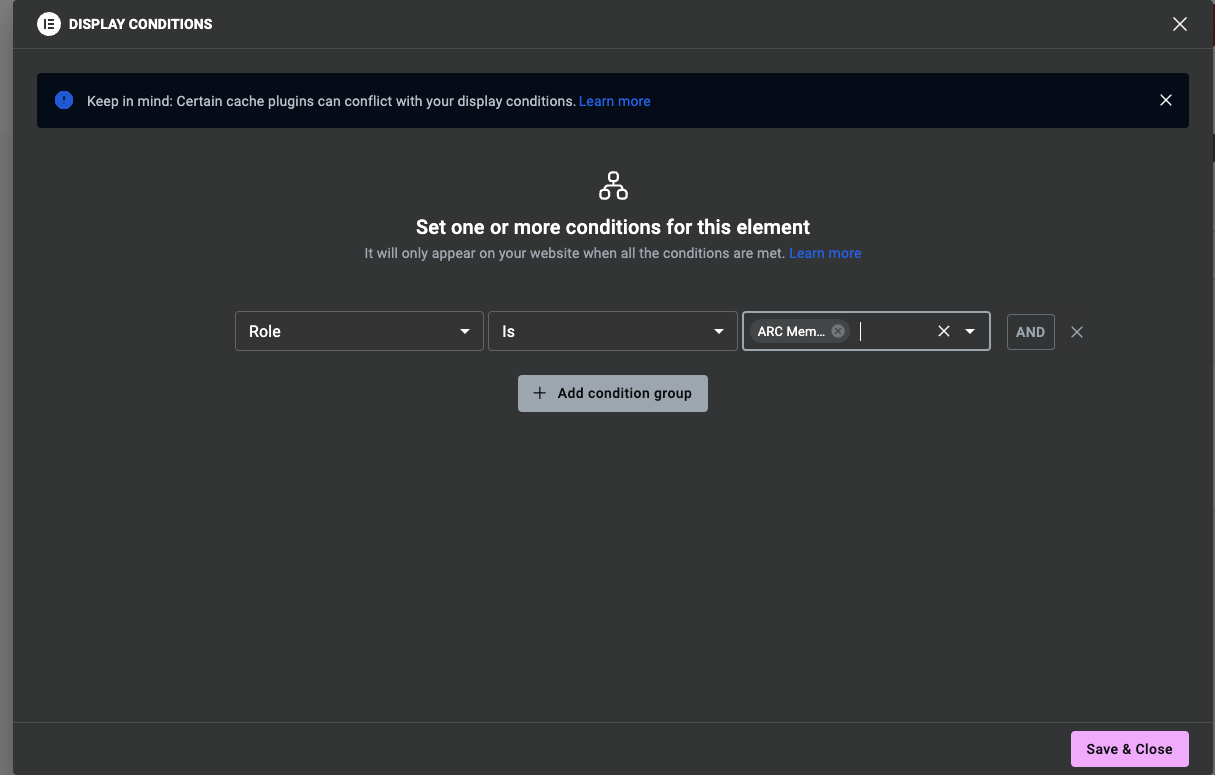
Once you have Elementor Pro, you can use the display conditions on any of the elements like the forms or PDF/ePUB to be sure only the ARC team can see it. -
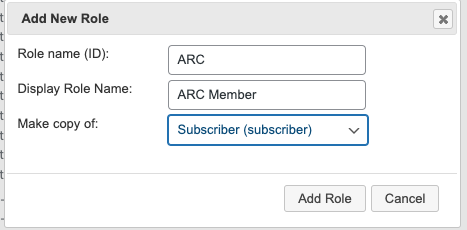
Role Manager Plugin: Create a custom role—“ARC Member”—so only approved readers can access your protected content. This takes less than a minute to set up but makes all the difference in keeping your content secure. (Bonus: You can create roles for each book if you want even tighter control.)
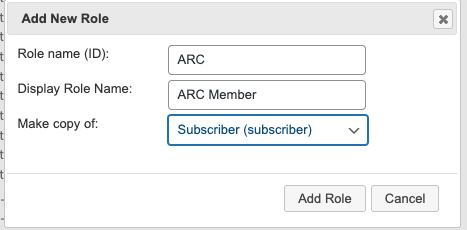
Creating a new role takes about 2.2 seconds. Pro tip: Consider creating a new role for each book so you can be extra sure the right team has access. -
FluentCRM: Your automation powerhouse. FluentCRM keeps everything in one place—no 3rd-party ESPs or sky-high subscriber fees. Automate emails, track engagement, and nudge ARC readers with ease.
-
PDF Embedder: Embed your ARC file directly on your site and disable downloads to keep it secure. Pair it with BookFunnel for even more control.
Together, these tools build a streamlined system that’s as secure as it is efficient.
Step 2: Build Your ARC Page in Elementor
Here’s how to structure your ARC page:
1. Application Form
Use a Gravity Form or Fluent Form to collect ARC applications. Ask for:
-
Name and email address
-
Preferred format (eBook, PDF, or physical copy)
-
Agreement to deadlines and terms
With Elementor’s Display Conditions, you can hide this form for logged-in users who already have the “ARC Member” role. And you can create automations to send them the work in the format they select automatically if you want.
2. Embed the ARC File
Upload your ARC file using PDF Embedder to display it directly on your website. Disable the download button to reduce the risk of unauthorized sharing and ensure readers access the file only from your site.
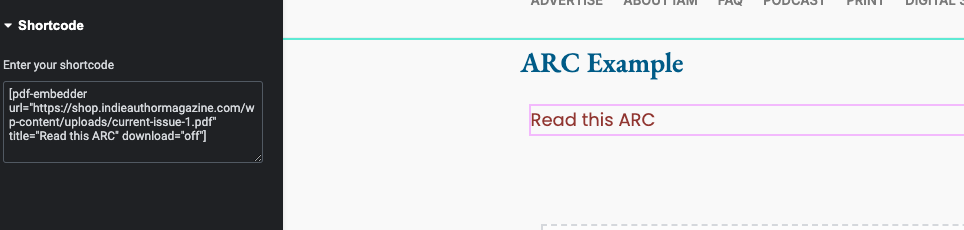
Here’s why doing it this way matters: your ARC readers will engage with the content on your website, where you’re tracking their activity. This means you can see who’s visited the ARC page, viewed the file, and how long they’ve spent interacting with it. Using tools like FluentCRM, you can set up automations to send tailored follow-ups based on their actions—or lack of actions.
For example:
-
If a reader hasn’t visited the ARC page within a week of receiving the link, trigger a gentle reminder email to prompt them.
-
If they’ve accessed the page but haven’t submitted feedback, send a follow-up to check in and encourage them to complete the process.
This approach keeps your content secure while giving you the insights and tools to nudge readers toward completing their feedback and reviews. It’s not just a content hub—it’s an engagement tracker in disguise.
3. Feedback Form
Add a second form to your ARC page specifically for collecting feedback or review links from your readers. To ensure this form is only accessible to your approved ARC team, use Elementor’s Display Conditions to make it visible only to logged-in users with the “ARC Member” role.
But here’s where it gets interesting: you can use conditional formatting to customize the experience based on their feedback. For instance:
-
Positive Feedback (4 or 5 Stars): If a reader shares glowing feedback, display links to retailers like Amazon, Goodreads, or BookBub, making it easy for them to post their reviews publicly.
-
Constructive Criticism (3 Stars or Below): If their feedback suggests room for improvement, you can hide the retailer links and prompt them to submit their thoughts privately.
You can also take this a step further:
-
Route Negative Feedback: Automatically forward less-than-stellar responses to a trusted person, like your PA or a colleague, who can review and respond. This keeps you focused on your creative work and spares you from the emotional sting of reading critical comments firsthand.
This setup doesn’t just gather feedback; it lets you manage responses strategically, ensuring that glowing reviews are celebrated, and constructive feedback is handled with care.
4. Review Buttons
Make it easy for ARC members to leave reviews by adding buttons that link directly to Amazon, Goodreads, or other platforms.
This setup keeps everything organized, secure, and easy for your ARC team to navigate while you stay on the right side of the terms of service for retailers.
Step 3: Automate the Workflow
Now let’s bring it all together with automations:
1. Application Submission
When someone fills out the application form, Elementor Forms, Gravity Forms or Fluent Forms automatically creates a pending user with the “ARC Member” role.
2. Approval and Welcome Email
Once you approve their application, change the tag for the user and FluentCRM sends a welcome email. This email includes:
-
Login details for accessing the ARC page
-
A link to the ARC file
-
A quick overview of the program and expectations
3. Engagement Tracking
Remember FluentCRM doesn’t just track emails—it also monitors website activity. Imagine knowing if your ARC readers have visited the ARC page, clicked to view the embedded file, or even interacted with your review buttons. Can you do this with other ESPs? Yes.
With this data, you can set up personalized automation sequences to keep readers engaged based on their actual behavior. Here’s how it works:
-
Visited the ARC Page but Didn’t Submit Feedback: Send a friendly reminder email a week later.
-
Opened the Email but Didn’t Click Anything: Follow up with helpful tips on how to access the ARC or leave a review.
-
Inactive for 14 Days: Trigger a “last chance” email to check in, thank them for their interest, and remind them of the deadline.
Example Automation Sequence:
-
Reminder 1: A nudge a week after they’re sent the ARC, encouraging them to dive in and reminding them of the feedback deadline.
-
Reminder 2: A follow-up closer to the deadline with a link to the review page and tips for writing quick reviews.
-
Reminder 3: A final email thanking them for participating and asking if there’s anything else they need to complete their feedback.
These sequences aren’t just gentle nudges—they’re strategic automations that respond to what your readers are (or aren’t) doing. By tracking their interactions, you can guide them through the ARC process without feeling like a nag.
The result? Engaged ARC readers, more feedback, and fewer unanswered emails clogging up your inbox. And based on their action or inaction, you can change their status for the next book automatically with an email.
Let me Just Remind Everyone Why FluentCRM is My Top Pick
I’m a firm believer in not building on rented land. FluentCRM lives inside WordPress, meaning all your data stays on your site—not with a third-party platform. If you’ve ever been locked out of MailerLite, you feel this in your soul.
More reasons to consider it:
-
Centralized data: Everything—applications, emails, engagement—stays in one place.
-
Automation made easy: You can create complex workflows without leaving your WordPress dashboard.
-
Budget-friendly: Unlike ESPs that charge per subscriber, FluentCRM has a one-time payment option (thank you, lifetime deals!).
That’s not to say external ESPs like Mailchimp or ConvertKit aren’t great (I still use Substack for this newsletter, obvs). But having full ownership of your data will always be my end-game.
Want to Fast-Track Your Setup? Join as a Paid Subscriber!
Paid subscribers to this newsletter get exclusive access to everything you need to set up your ARC workflow in record time, including:
-
Elementor Templates: Pre-built templates with all the conditional programming you’ll need for your ARC page—just plug in your content and go.
-
Gravity Form Imports: Ready-to-use forms for ARC applications and feedback, saving you hours of setup.
-
Welcome Email Template: A polished, pre-written email to onboard your ARC members effortlessly.
-
Step-by-Step Training: Access to a live session (or recording) that walks you through the entire setup process in under an hour.
Streamline your ARC process without the trial-and-error. Join as a paid subscriber and get everything you need to hit the ground running.
This is Just the Beginning
While this system is designed for ARC teams, it’s adaptable to memberships, premium content, and more. Managing ARC teams doesn’t have to be stressful—with WordPress, Elementor, and some clever automations, you can create a system that’s secure, scalable, and simple.
Next week, we’re talking CRMs vs. ESPs: what they do, when to use them, and why it matters for your author business.
And don’t forget to join this week’s chat about the “suck list”—a simple method to turn your pain points into powerful automations.